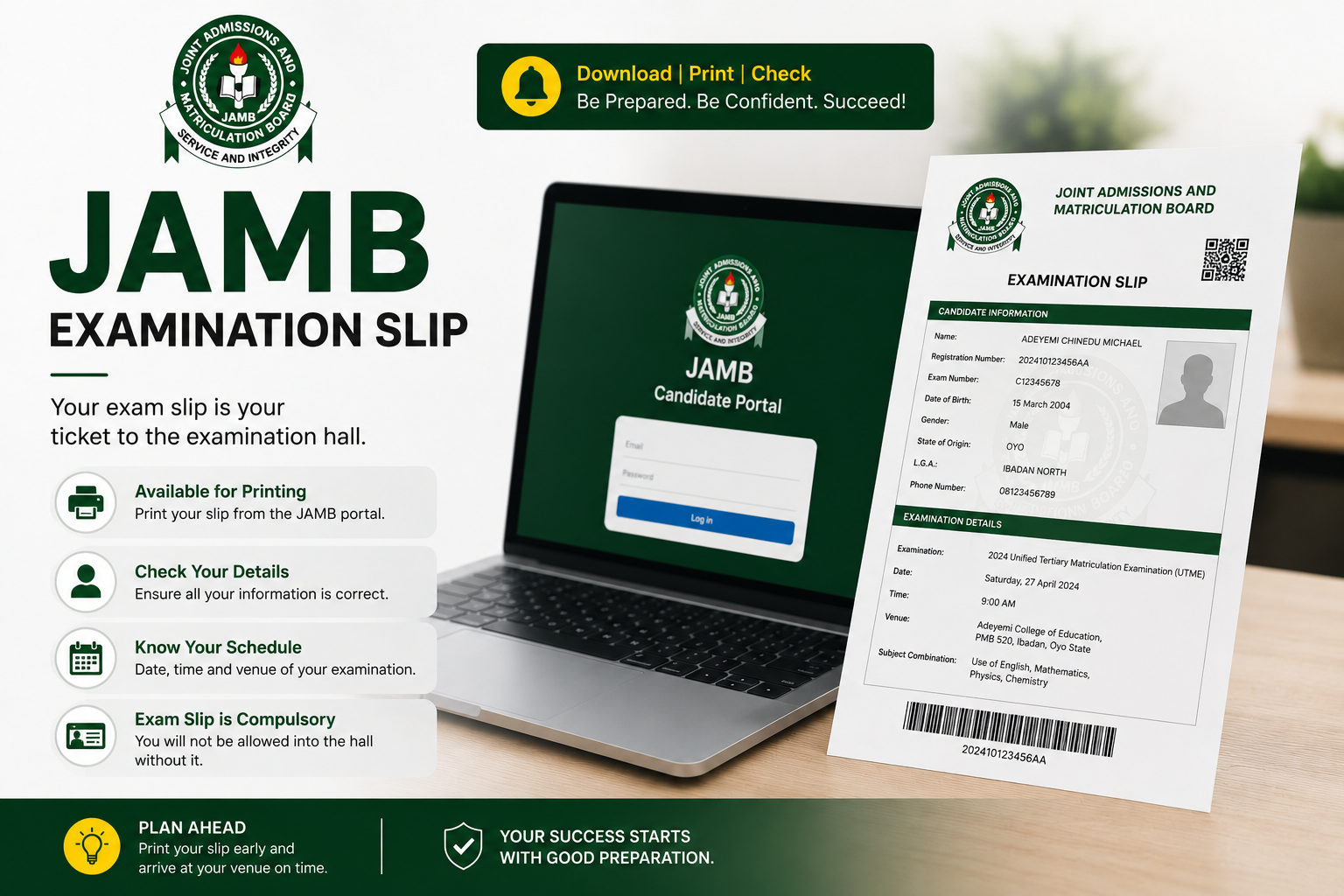
If you have registered for the JAMB Unified Tertiary Matriculation Examination, one of the most important things you need to do before your exam date is print your JAMB examination slip. Without it, you may not be allowed into the examination centre — and that is the last situation any candidate wants to find themselves in on exam day.
A lot of candidates are unsure about what the examination slip actually is, where exactly to get it, what it contains, and the exact steps to print it. This guide answers all of that clearly and completely so you can walk into your UTME examination centre with everything in order.
What Is a JAMB Examination Slip?
The JAMB examination slip — also called the UTME notification slip or JAMB exam notification slip — is an official document issued by the Joint Admissions and Matriculation Board to every candidate who has successfully registered for the UTME. It is the document that formally confirms your examination schedule and serves as your entry pass into the CBT examination centre on the day of your exam.
Think of it as your examination ID card for the UTME. Without it, the examination centre officials have no way of confirming your registration details, your assigned seat, or your examination schedule. Most centres will turn you away at the gate without it — so printing it early and keeping it safe is not optional.
JAMB typically announces the opening of examination slip printing a few days before the UTME begins. Once the printing window opens, every registered candidate is expected to log in to the JAMB portal and print their slip before their scheduled exam date.
What Does the JAMB Examination Slip Contain?
The JAMB examination slip carries all the essential information you need for your exam day. Here is what you will find on it:
- Your full name — as registered on the JAMB portal
- Your JAMB registration number — the unique number assigned to you during registration
- Your passport photograph — the photo you uploaded during registration
- Your examination date — the specific day you are scheduled to sit the UTME
- Your examination time — the session time you have been assigned, either morning or afternoon
- Your examination centre — the name and address of the CBT centre where you will write your exam
- Your seat number — your specific assigned seat within the examination hall
- Your subjects — the four UTME subjects you selected during registration
- Your phone number and email address — as provided during registration
- Basic JAMB rules and regulations — important instructions you are expected to read and comply with on exam day
Every detail on this slip matters. Before you leave the printing page, check each piece of information carefully. If anything looks wrong — wrong name spelling, wrong exam centre, or any other discrepancy — contact JAMB immediately through their official support channels before your exam date.
Why Is the JAMB Examination Slip Important?
Some candidates treat the examination slip as a minor formality, but it is anything but that. Here is why it matters:
It Is Your Entry Pass Into the Examination Centre
CBT centre officials use the examination slip to verify your identity and confirm your registration before allowing you into the hall. Without it, you have no proof that you are a registered candidate for that session. Most centres enforce this strictly — especially in recent years where JAMB has tightened examination security.
It Confirms Your Examination Schedule
Your exam date and time are not always what you expect them to be. JAMB assigns candidates to sessions based on the registration batch, the CBT centre’s capacity, and other logistical factors. The only way to know your exact date, time, and centre is to print your slip and check. Assuming you know your schedule without confirming it on the slip has caused many candidates to miss their exam entirely.
It Contains Your Exam Centre Address
Nigeria has CBT centres across all states, and many cities have multiple centres. Your slip tells you the exact centre where you are assigned. Going to the wrong centre — even on the right date — means you will not be able to write your exam. Knowing your centre in advance and planning your route to it is one of the most important parts of exam preparation.
It Serves as an Official JAMB Document
Beyond exam day, your JAMB examination slip is an official document that can serve as proof of your UTME registration in situations where your full JAMB result slip is not immediately available. Some institutions request it during screening or document verification processes.
When Does JAMB Open Examination Slip Printing?
JAMB typically opens the examination slip printing portal a few days before the UTME examinations begin. For the 2025 UTME, printing opened on Saturday, April 19, 2025 — approximately five days before the examination commenced on April 24, 2025. For the 2026 UTME, JAMB confirmed that slip printing went live from Thursday, April 9, 2026, ahead of examinations that ran from April 16 to April 25, 2026.
Based on this pattern, candidates can expect the printing window to open approximately one to two weeks before the examination period each year. JAMB makes an official announcement through its website and social media channels when printing begins. Monitoring these channels — or trusted Nigerian education platforms — ensures you do not miss the announcement.
Do not wait until the last minute to print your slip. Print it as soon as the portal opens, check your details carefully, and keep the printed copy in a safe place.
What You Need Before You Print
Before you begin the printing process, make sure you have the following ready:
- Your JAMB registration number — the number on your JAMB registration slip, which is an eleven-digit number starting with the year of registration
- Your registered email address or phone number — some versions of the printing portal accept any of these as login identifiers
- A stable internet connection — avoid printing on an unstable connection to prevent errors mid-process
- Access to a printer — either at home, at a cyber cafe, or at any JAMB accredited centre near you
- A compatible browser — Google Chrome or Mozilla Firefox works best. Make sure your browser allows pop-ups from the JAMB website, as the slip opens in a pop-up window
How to Print Your JAMB Examination Slip — Step by Step
There are two ways to print your JAMB examination slip — through the direct JAMB slip printing portal or through the JAMB e-facility portal. Both methods are official and lead to the same result. Here is how each works:
Method 1 — Using the Direct JAMB Slip Printing Portal
- Open your browser and go directly to the JAMB examination slip printing page at slipsprinting.jamb.gov.ng/PrintExaminationSlip. This is the dedicated URL for printing examination slips and is the fastest route.
- Enter your details — on the page that loads, you will see a field where you enter your JAMB registration number, email address, or phone number. Enter whichever the portal requests accurately. Double-check for typos before proceeding.
- Click the Print Examination Slip button — once your details are entered correctly, click the button to proceed. The portal will verify your registration and pull up your examination slip.
- Allow the pop-up — your examination slip will open in a pop-up window or a new browser tab. If nothing appears, check your browser settings and make sure pop-ups are allowed for the JAMB website. You can do this by clicking the pop-up notification that appears in your browser’s address bar.
- Review your details carefully — before printing, read through every detail on the slip. Confirm your name, exam date, exam time, exam centre, and subjects. If anything is incorrect, do not ignore it — contact JAMB support immediately.
- Print the slip — once you have confirmed everything is correct, use your browser’s print function (Ctrl + P on Windows or Command + P on Mac) to print the document. Print at least two copies — one to take to the examination centre and one to keep for your personal records.
Method 2 — Using the JAMB E-Facility Portal
- Go to the JAMB e-facility portal at efacility.jamb.gov.ng and log in with your JAMB profile email address and password.
- Navigate to your dashboard — once logged in, you will see your candidate dashboard with various options available to you.
- Click on “Print Examination Slip” — locate this option on your dashboard and click it.
- Select “Print UTME Main Examination Slip” — this will pull up your specific examination slip for the UTME.
- Review and print — check all details on the slip carefully, then proceed to print two copies as described above.
Both methods give you the same slip. Use whichever one works more smoothly for you on the day you are printing.
How to Print Your JAMB Examination Slip at a Cyber Cafe or JAMB Centre
If you do not have access to a personal printer at home or at work, you can print your examination slip at any cyber cafe or JAMB accredited centre near you. Here is how to approach it:
- Go to the cyber cafe with your JAMB registration number, registered email address, and phone number written down or saved on your phone
- Ask the attendant to help you access either of the two portal URLs above
- Enter your details, pull up your slip, review the information, and print two copies
- Pay the standard printing fee charged at the cafe — this is usually a small amount
If you prefer going through an official JAMB channel, visit any JAMB accredited CBT centre in your area and request assistance with printing your slip. Staff at accredited centres are equipped to help candidates with this process.
Can You Print Your JAMB Examination Slip More Than Once?
Yes — you can print your JAMB examination slip as many times as you need. There is no limit on the number of times you can reprint it. If you misplace your copy, damage it, or simply want a cleaner print, go back to the same portal and print again. The slip will remain available for printing throughout the examination period.
This is one of the more candidate-friendly aspects of the JAMB slip system — you do not need to panic if something happens to your copy before exam day.
Tips to Keep in Mind Before Exam Day
- Print early — do not wait until the night before your exam. Print your slip as soon as JAMB announces that printing is open and store it safely.
- Print two copies — keep one at home as a backup and take one to the centre. JAMB officially advises candidates to print at least two copies.
- Visit your exam centre in advance — if possible, locate your CBT centre at least a day before your exam. This eliminates the risk of getting lost or arriving late on the actual day.
- Go with valid ID — in addition to your examination slip, bring a valid means of identification — National ID card, voter’s card, international passport, or JAMB registration slip. Centres may request this alongside the examination slip.
- Arrive early on exam day — JAMB strictly enforces timing. Candidates who arrive after the session has started are typically not admitted. Aim to be at your centre at least 30 to 45 minutes before your session time.
- Do not bring prohibited items — your examination slip contains a list of items not allowed into the hall. Read these rules before your exam day to avoid being turned away at the gate.
Frequently Asked Questions About the JAMB Examination Slip
When can I print my JAMB examination slip?
JAMB typically opens the slip printing portal one to two weeks before the UTME examinations begin. An official announcement is made on the JAMB website and social media channels when printing commences. For 2026, printing opened on April 9, 2026 ahead of examinations that started April 16.
What is the official website to print the JAMB examination slip?
The official direct URL for printing your JAMB examination slip is slipsprinting.jamb.gov.ng/PrintExaminationSlip. You can also access it through the JAMB e-facility portal at efacility.jamb.gov.ng. Always use these official URLs — avoid third-party websites claiming to offer slip printing services.
What do I need to print my JAMB examination slip?
You need your JAMB registration number, your registered email address or phone number, a stable internet connection, a compatible browser, and access to a printer. If you do not have a printer, any cyber cafe or JAMB accredited centre can help you print it.
Can I print my JAMB examination slip on my phone?
Yes. You can access the JAMB slip printing portal on your smartphone using Chrome or Firefox. However, you will still need to connect to a printer to get a physical copy. You can download the slip as a PDF on your phone and print it later at a cyber cafe or print shop.
What if the details on my examination slip are wrong?
If you notice any incorrect details on your slip — wrong name, wrong exam centre, or any other error — do not proceed to the examination with a slip containing wrong information. Contact JAMB immediately through their official helpline or visit the nearest JAMB office with your registration details. Act quickly because corrections take time to process and your exam date will not wait.
Can I write my JAMB exam without the examination slip?
In most cases, no. CBT centre officials use the examination slip to verify your identity and confirm your registration before granting you entry. Candidates without their examination slip are typically turned away. Always print and carry your slip to the examination centre.
Is there a fee for printing the JAMB examination slip?
No. Printing your JAMB examination slip through the official JAMB portal is completely free. If you print at a cyber cafe, you will only pay the standard printing charge for the pages — you should not be charged any special fee for accessing your slip. Anyone asking for a fee to access or process your slip online is attempting to defraud you.
How many copies of the examination slip should I print?
JAMB officially advises candidates to print at least two copies — one to take to the examination centre and one to keep for personal records. Some candidates print three copies for extra security. There is no limit on how many times you can reprint your slip.
Final Thoughts
Your JAMB examination slip is a small document with a big role on exam day. It confirms your identity, your schedule, and your assigned centre — and without it, getting into the examination hall becomes a serious problem. Print it as soon as JAMB opens the portal, check every detail carefully, keep multiple copies, and locate your exam centre before the day arrives.
Everything else — your preparation, your knowledge, your performance on the day — matters more. But none of it matters if you cannot get through the examination centre gate. Sort your slip early and focus on what really counts.
If this guide helped you, share it with a fellow JAMB candidate who might need it. And if you have questions about the examination slip or anything JAMB-related, drop them in the comments section below.