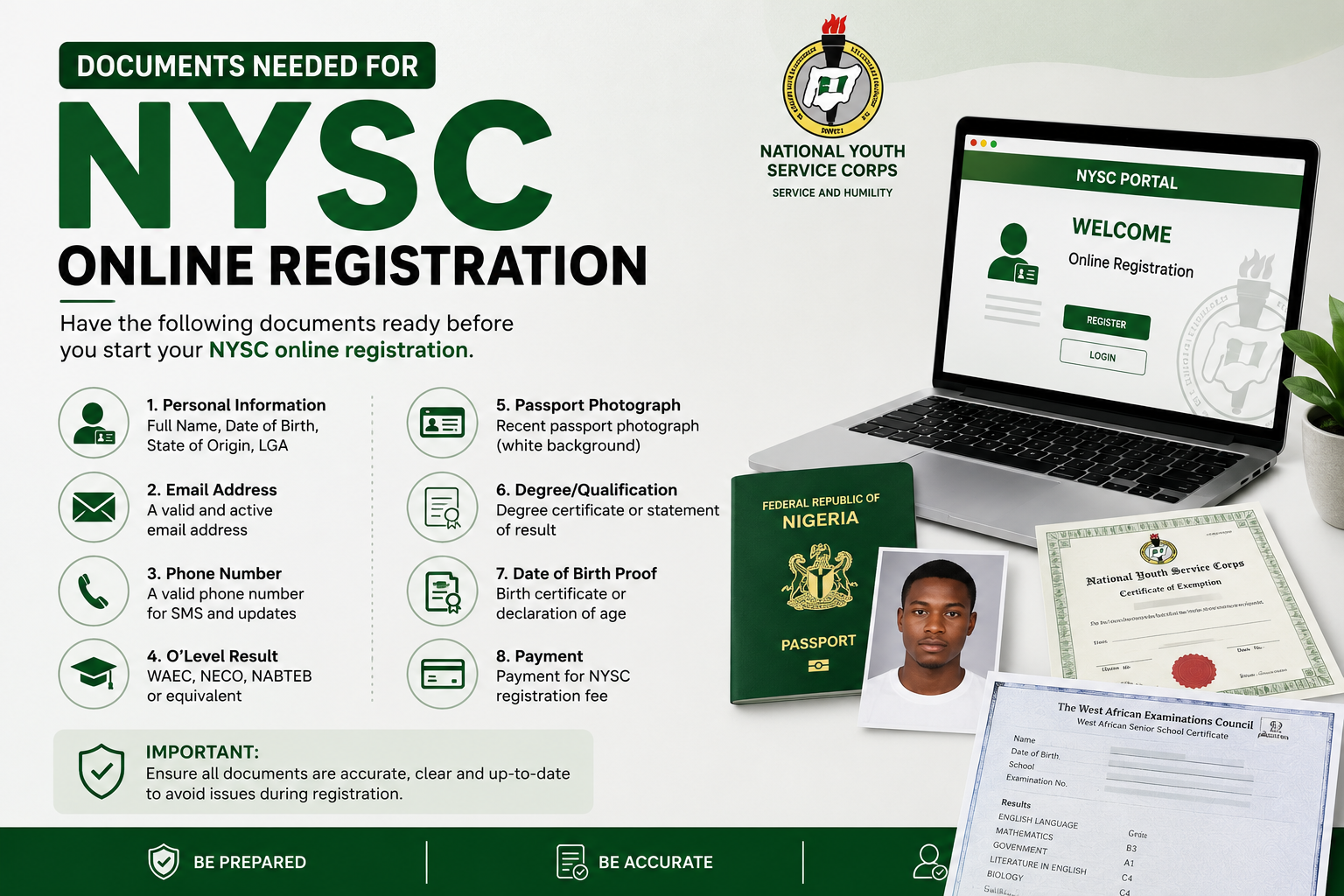
Understanding exactly what documents are needed for NYSC online registration — what each document must contain, what format it must be in, and what the portal will and will not accept — eliminates most of these problems before they begin. This guide covers the complete, up-to-date checklist of documents required for NYSC online registration in 2025, with specific guidance on how to prepare each document correctly, what mistakes to avoid, and what to do if you encounter problems during the upload process.
Whether you are mobilising for Batch A, Batch B, or Batch C, whether you attended a Nigerian university or a foreign institution, and whether this is your first registration attempt or you are dealing with a correction from a previous session — this guide has everything you need.
Why Getting Your Documents Right Matters
The NYSC online registration portal is designed to verify your identity, confirm your academic qualifications, and collect the personal information needed to assign you to a state of deployment and an orientation camp. Every document you upload serves a specific verification function. If a document is missing, incorrectly formatted, or contains information that does not match what your institution submitted on the senate list, the system will flag your registration or reject it outright.
Document errors are one of the top three reasons corps members face registration problems — alongside senate list issues and portal technical errors. Unlike senate list problems, which require your institution to make corrections on your behalf, document problems are entirely within your control to prevent. Preparing your documents correctly before the portal opens costs you a few hours of careful preparation. Dealing with a rejected registration during the portal window costs you significantly more — in time, stress, and potentially in missing your intended mobilisation batch entirely.
Treat document preparation as a serious part of your NYSC mobilisation process, not an afterthought. The investment is small. The return — a smooth, error-free registration — is significant.
Complete List of Documents Needed for NYSC Online Registration
1. Passport Photograph
What Is Required
A recent passport-sized photograph is one of the most fundamental documents needed for NYSC online registration. This photograph will appear on your NYSC call-up letter, your ID card, and other official NYSC documents throughout your service year. The quality and specification of this photograph matter — a poorly taken, incorrectly sized, or non-compliant photograph is one of the most common causes of registration rejection.
Specifications
Your passport photograph must meet the following specifications for the NYSC portal. The photograph must be a recent colour photograph taken against a white background — not cream, not light grey, but plain white. Your face must be clearly visible, centred in the frame, and occupying approximately seventy to eighty percent of the photograph area. No sunglasses, hats, caps, scarves covering the face, or heavy filters are permitted. The photograph must be in JPEG or JPG format and must not exceed 200 kilobytes in file size. The recommended dimensions are 150 by 150 pixels to 400 by 400 pixels — though the portal may accept slightly different dimensions provided the file size and format requirements are met.
Common Mistakes to Avoid
The most common passport photograph mistakes that cause NYSC portal rejection include: using an old photograph that no longer looks like you; photographing against a coloured or patterned background; using a photograph with a shadow across the face; uploading a photograph that exceeds the file size limit; and uploading a photograph in PNG or PDF format rather than JPEG. Have your photograph taken specifically for NYSC registration — do not repurpose an old ID or social media photograph. Professional passport photograph studios in any Nigerian city can produce a compliant digital photograph for a minimal cost.
2. O’Level Result(s) — WAEC, NECO, or NABTEB
What Is Required
Your O’Level result — from WAEC, NECO, GCE, or NABTEB — is a required document for NYSC online registration. It serves as proof of your foundational academic qualification and must be uploaded in a legible, scannable format. If you have results from two sittings — as is common for students who had carry-over subjects from their first sitting — you must upload both result slips.
Specifications
The O’Level result must be uploaded as a scanned copy of the original result slip or a printed copy of the result checker printout. It must be clear and fully legible — all subject names, grades, examination year, and candidate number must be readable without zooming in excessively. The document should be scanned or photographed in JPEG or PDF format and must not exceed the portal’s file size limit — typically 200 kilobytes to 500 kilobytes depending on the current portal version.
What If Your Result Is Online Only?
If your WAEC or NECO result is available only through the online result checker and you do not have a physical result slip, print a clear copy of the result checker output from the official WAEC or NECO website. Ensure the printout is complete — all subjects and grades visible — and that it clearly shows your name and examination number. This printed online result is generally accepted by the NYSC portal, though the original physical result slip is preferable where available.
3. Degree Certificate or Statement of Result
What Is Required
Proof of your university degree is one of the most critical documents needed for NYSC online registration. At the time of first registration, many graduates do not yet have their physical degree certificate — university certificate production in Nigeria typically takes months to years after graduation. The NYSC portal accepts either the degree certificate or a Statement of Result as proof of graduation at the registration stage.
Statement of Result vs. Degree Certificate
A Statement of Result is an official document issued by your university confirming that you have completed all requirements for your degree — it includes your name, registration number, programme of study, class of degree, and date of completion. It carries the signature of the registrar or an authorised university official and the university seal. This document is the standard alternative to the degree certificate for NYSC registration and is accepted as full proof of graduation provided it is issued on official university letterhead and carries the appropriate authentication.
If your degree certificate has been produced and collected, upload a clear scan of the certificate instead. The certificate and the statement of result serve the same function at this stage — both confirm that you have completed your degree and are eligible for mobilisation.
Specifications
The degree certificate or statement of result must be uploaded as a clear, legible scanned copy. All text must be fully readable — your name, programme, class of degree, and graduation year. Upload in JPEG or PDF format within the portal’s file size limit. Ensure the university seal and authorised signature are clearly visible in the scan.
4. Birth Certificate or Age Declaration
What Is Required
Proof of date of birth is a required document for NYSC online registration. The NYSC uses your date of birth to confirm that you meet the age eligibility requirements for the service programme — corps members must be thirty years old or younger at the time of mobilisation. Graduates who are above thirty years of age are not eligible for the NYSC programme and must apply for an exemption certificate instead.
Accepted Documents
The NYSC portal accepts either a birth certificate issued by the National Population Commission (NPC) or a sworn age declaration affidavit from a court of law as proof of age. The birth certificate is the preferred document — it is the most authoritative proof of date of birth and is less likely to raise questions during document verification at camp. If you do not have an NPC birth certificate, an affidavit of age declaration sworn before a magistrate or high court is accepted as an alternative.
Specifications
Upload a clear scan of your birth certificate or age declaration affidavit. The document must clearly show your full name and date of birth as registered. If there is a discrepancy between the date of birth on this document and the date of birth on your JAMB or university records, address the discrepancy before attempting portal registration — inconsistencies in date of birth are a common cause of registration problems that can delay your mobilisation significantly.
5. Local Government Area (LGA) Identification
What Is Required
The NYSC uses your Local Government Area of origin for deployment purposes — corps members are typically deployed to a state other than their state of origin, and the LGA information helps the NYSC manage the distribution of corps members across states and geopolitical zones. You are required to upload an LGA identification document as part of your online registration.
Accepted Documents
The most commonly accepted LGA identification documents for NYSC registration include: a letter of identification from your local government secretariat confirming your LGA of origin; an affidavit of indigeneship from a court of law; or a letter from a recognised traditional ruler or community leader in your LGA attesting to your indigeneship. Some portals also accept a national identity card or international passport with your LGA information where it is explicitly stated. The LGA secretariat letter is the most straightforward and most widely accepted option — visit your LGA secretariat, present appropriate identification, and request a letter of identification for NYSC purposes.
6. Nigerian Identity Document — National ID, International Passport, Voter’s Card, or Driver’s Licence
What Is Required
A valid Nigerian government-issued identity document is required for NYSC online registration as an additional means of identity verification. This document confirms that you are a Nigerian citizen and provides an additional cross-reference for your personal details beyond your academic documents.
Accepted Identity Documents
The NYSC portal accepts any of the following as valid identity documents: a National Identity Card or slip issued by the National Identity Management Commission (NIMC); an international passport issued by the Nigerian Immigration Service; a Permanent Voter’s Card (PVC) issued by the Independent National Electoral Commission (INEC); or a Driver’s Licence issued by the Federal Road Safety Corps (FRSC). Any one of these is sufficient — you do not need to upload all of them.
For graduating students who do not yet have any of these documents — which is more common than it should be — the most quickly obtainable option is the NIMC National Identity Card or NIN slip. NIMC enrolment can be completed at any NIMC enrolment centre or through the NIMC mobile app, and the NIN slip is typically available immediately upon enrolment. Do not leave obtaining your identity document until the portal registration window opens — apply well in advance.
7. University Transcript or Academic Record (Where Required)
What Is Required
Some versions of the NYSC portal registration process require the upload of an official academic transcript in addition to the degree certificate or statement of result. The transcript provides a detailed record of your academic performance — the courses taken, credit units, and grades obtained across all semesters of your programme. Even when the portal does not explicitly require a transcript upload during online registration, having a copy available is advisable as it may be requested during physical verification at the orientation camp.
How to Obtain Your Transcript
Transcripts are issued by your university’s examinations and records office or academic registrar’s office. Request your transcript well in advance of the portal registration window — transcript production at many Nigerian universities takes two to four weeks or longer. Specify when requesting whether you need an official sealed copy for NYSC purposes or whether an unofficial copy suffices for the portal upload stage.
8. Nysc Exclusion Letter (If Applicable)
What Is Required
If you have previously been registered for NYSC but did not complete the service year — due to illness, study abroad, or other reasons — you may need to upload an NYSC exclusion letter from your previous mobilisation. This letter, obtained from the NYSC, explains the circumstances of your previous registration and authorises your re-mobilisation. Not all candidates will need this document — it applies only to those who have a previous NYSC registration on record that was not completed.
9. Certificate of Completion of Industrial Training (IT) — Where Applicable
What Is Required
For graduates of certain programmes — particularly Engineering, Sciences, and Technology programmes — a certificate or letter confirming completion of the Student Industrial Work Experience Scheme (SIWES) or industrial training placement may be required as part of the NYSC registration documentation. This document confirms that you completed the mandatory industrial training component of your programme, which is a prerequisite for graduation in many technical and vocational programmes.
If your programme required SIWES or industrial training, ensure you have a copy of your IT completion letter or certificate from your supervising organisation before the portal registration window opens. This is particularly important for Engineering, Computer Science, and Agricultural Science graduates.
10. Clearance Letter From Your Institution (Where Applicable)
What Is Required
Some institutions issue a specific NYSC clearance letter or mobilisation letter to graduating students who have completed all institutional requirements and are cleared for NYSC mobilisation. Where your institution issues such a letter, it should be uploaded as part of your registration documentation. This letter typically confirms that you have no outstanding obligations to the university and are formally cleared for service year participation.
Check with your institution’s registrar or NYSC desk to find out whether your institution issues this type of clearance letter and, if so, how to obtain it. Not all universities issue this document — many institutions consider the senate list submission itself to be the equivalent clearance — but for those that do, failing to upload it can cause registration problems.
Document Specifications Summary
To avoid confusion at the point of upload, here is a consolidated summary of the key technical specifications for documents needed for NYSC online registration. All documents must be clear and fully legible. Most documents should be in JPEG, JPG, or PDF format — PNG is not accepted by all versions of the portal. Individual file sizes should generally not exceed 200 kilobytes for photographs and 500 kilobytes for other documents, though the portal may display the specific limit for each upload field. Ensure all documents are properly oriented — an upside-down or sideways scan will be rejected or flagged. Where you are scanning physical documents, use a scanner rather than a mobile phone camera where possible — scanner-produced images are consistently cleaner and more legible than phone photographs of documents.
How to Scan Your Documents Correctly
Many portal upload errors are caused not by the documents themselves but by the quality of the scans. Poor scanning produces files that are too large, too blurry, or in the wrong format — all of which cause upload failures or rejection during document review. Here is how to scan your documents correctly for NYSC portal upload.
If you have access to a flatbed scanner — at a business centre, a library, or a school — use it. Place the document flat on the scanner glass, scan at 150 to 200 DPI (dots per inch) for text documents, and save in JPEG or PDF format. At 150 DPI, most standard A4 documents scan to file sizes well within the portal’s limits while maintaining sufficient clarity for verification purposes. Scanning at 300 DPI produces larger, clearer files — which may exceed the file size limit and require compression before upload.
If you are using a mobile phone camera to photograph documents — which many students do — ensure the document is placed on a flat, evenly lit surface with no shadows falling across it. Use your phone’s document scanning app (most modern smartphones have one built in, and free apps like Adobe Scan and Microsoft Lens produce high-quality document scans) rather than the standard camera app. Document scanning apps automatically apply perspective correction, contrast enhancement, and edge detection that produce significantly better results than a standard photograph. Save the output as a JPEG or PDF and check the file size before attempting upload.
How to Compress Document Files That Are Too Large
One of the most frustrating upload errors is a file size rejection — where your document is perfectly correct in content but exceeds the portal’s maximum file size. This is particularly common for passport photographs and scanned certificates. Compressing the file resolves this without affecting the document’s content or legibility.
For JPEG photographs, free online tools like TinyJPEG, Compress JPEG, and ILoveIMG allow you to upload a photograph and reduce its file size to a target value without significantly degrading image quality. For PDF documents, ILovePDF and Smallpdf offer free PDF compression tools that reduce file size while preserving legibility. Both categories of tools are available online and require no software installation — simply upload your file, compress it, and download the compressed version for upload to the NYSC portal.
Step-by-Step NYSC Online Registration Process
Step One: Visit the Official NYSC Portal
Go to the official NYSC mobilisation portal at portal.nysc.org.ng. Do not use third-party websites or links shared on social media that claim to be the NYSC portal — always type the URL directly into your browser or access it from the official NYSC website at nysc.gov.ng. Fraudulent websites mimicking the NYSC portal have been used to harvest personal information from unsuspecting graduates — protect yourself by using only the official portal address.
Step Two: Create Your Account
Click on the registration link for the current mobilisation batch and create your portal account using your institution, degree programme, graduation year, and other requested details. Your institution and programme details must match exactly what your university submitted on the senate list — any discrepancy will prevent successful registration. Choose a strong password and record your login credentials in a secure location.
Step Three: Fill In Your Personal and Academic Details
Complete all required fields in the registration form — personal information (name, date of birth, LGA, state of origin), academic information (institution, programme, graduation year, degree class), and contact information (phone number, email address, next of kin). Enter your name exactly as it appears on your academic documents — do not use nicknames, shortened versions, or alternate spellings. Inconsistencies between your portal entry and your uploaded documents are a common source of registration problems.
Step Four: Upload Your Documents
Upload each required document in the designated upload fields. Check the file format and size requirements displayed for each field before uploading. After each upload, verify that the uploaded image or document is clear and fully legible by previewing it in the portal. Do not proceed to the next step if any upload appears blurry, cut off, or incorrectly oriented — replace it with a better quality version before continuing.
Step Five: Select Your Preferred State of Deployment
The portal gives you the opportunity to indicate a preferred state or geopolitical zone for your deployment. Note that preferred state selection is not guaranteed — the NYSC uses it as one input among many in the deployment algorithm, and actual deployment is ultimately at the NYSC’s discretion. Fill this section thoughtfully based on your genuine preferences, health considerations, or family circumstances.
Step Six: Review and Submit Your Registration
Before submitting, carefully review every section of your completed registration form. Check that your name is spelled correctly and consistently across all fields. Verify that your date of birth matches your birth certificate upload. Confirm that your institution and programme details are accurate. Once you are satisfied that everything is correct, submit your registration. After submission, print or save your registration confirmation as proof of completed registration.
Step Seven: Generate and Print Your Call-Up Letter
After your registration is processed and verified by the NYSC, your call-up letter will be made available for download on the portal. Check the portal regularly after submitting your registration for notification that your call-up letter is ready. Download it, print multiple copies, and keep at least one copy safely stored separately from the copy you will present at camp. Your call-up letter is your entry document for the orientation camp — do not travel to camp without it.
Documents to Bring Physically to the Orientation Camp
In addition to the documents uploaded during the online registration process, you will be required to present physical original copies of your documents at the orientation camp for verification. Arriving at camp without your physical documents — even if your online registration was successful — can cause problems during the physical screening exercise. The documents to bring to camp include your original degree certificate or statement of result, your original O’Level result slip, your original birth certificate or age declaration, your original LGA identification letter, your original government-issued identity document, and printed copies of your NYSC call-up letter and registration confirmation.
Pack all physical documents in a waterproof folder or envelope to protect them during transit to camp. Make photocopies of every document and keep the photocopies separate from the originals — if any original document is lost or damaged in transit, the photocopy provides a backup while you arrange for a replacement. This simple precaution prevents a scenario that derails camp admission for an avoidable reason.
Common Document Problems and How to Fix Them
Name Mismatch Between Documents
A name that is spelled differently across your various documents — your birth certificate says “Emmanuel” but your university certificate says “Immanuel,” or your surname appears in different orders on different documents — is one of the most common and most disruptive document problems in NYSC registration. The portal’s verification system looks for consistency across documents, and inconsistencies trigger flags that delay or prevent registration.
The resolution depends on which document has the error. If the error is on a university document — a misspelling on your statement of result or transcript — return to your university registry and request a correction. If the error is on a government document — your birth certificate or national ID — the resolution process involves the issuing authority and typically takes longer. Address name inconsistencies as early as possible — ideally before the portal registration window opens.
Expired Identity Document
An expired international passport or driver’s licence is not accepted as a valid identity document for NYSC registration. If your identity document has expired, renew it or obtain an alternative valid document — your national identity card or PVC — before the registration window opens. Do not wait until the portal is open to discover that your identity document is expired.
Unacceptable File Format
If the portal rejects your document upload with a file format error, convert the file to the accepted format using a free online conversion tool before retrying. JPEG and PDF are the most universally accepted formats on the NYSC portal. PNG files should be converted to JPEG. DOCX or other word processor formats should be converted to PDF. Free conversion tools like Smallpdf, ILovePDF, and Convertio handle these conversions quickly and without requiring software installation.
Frequently Asked Questions
What documents do I need for NYSC online registration?
The core documents needed for NYSC online registration are: a recent passport photograph against a white background; your O’Level result (WAEC, NECO, or NABTEB); your degree certificate or statement of result from your university; your birth certificate or age declaration affidavit; your LGA identification letter; and a valid government-issued identity document (national ID, international passport, PVC, or driver’s licence). Additional documents may be required depending on your specific circumstances — such as an NYSC exclusion letter for re-mobilising corps members or an IT completion certificate for engineering and science graduates.
Can I use my WAEC result checker printout for NYSC registration?
Yes — a printed copy of your WAEC result checker output from the official WAEC website is accepted for NYSC online registration where the physical result slip is unavailable. Ensure the printout is clear, complete, and shows all subject grades, your name, and your examination number. Print it on plain white paper and scan or photograph it cleanly before uploading to the portal.
What happens if I upload the wrong document?
If you upload the wrong document in a registration field and notice it before submitting your registration, you should be able to replace it by clicking the upload field again and selecting the correct file. If you have already submitted your registration and discover an error, contact the NYSC through the portal’s help or correction request function, or visit your nearest NYSC state secretariat for guidance on how to submit a correction.
Do I need my original degree certificate for NYSC registration?
No — a statement of result issued by your university is accepted as an alternative to the degree certificate for NYSC online registration, which is important because many graduates do not yet have their physical degree certificate at the time of mobilisation. You will however need to present your original degree certificate or a certified copy during the physical verification at the orientation camp or at your place of primary assignment (PPA) during the service year. Begin the process of collecting your degree certificate from your institution as early as possible after graduation.
What format should my passport photograph be for NYSC registration?
Your NYSC passport photograph must be in JPEG or JPG format, taken against a plain white background, with your face clearly centred and visible, and must not exceed 200 kilobytes in file size. The photograph must be recent — taken within the past six months — and must not include sunglasses, hats, or face coverings. Have it taken professionally at a passport photograph studio and request the digital file in JPEG format for portal upload.
Can I complete NYSC online registration on my phone?
Yes — the NYSC portal is accessible on mobile devices, and many corps members complete their registration using a smartphone. However, mobile registration is more prone to technical errors — particularly during document uploads — than desktop or laptop registration. If you are registering on a mobile device, use a stable internet connection, ensure your browser is updated, and clear your browser cache before starting. For the document upload steps specifically, having your files already prepared and saved on your device before beginning registration makes the process significantly smoother.
Final Thoughts
The documents needed for NYSC online registration are not complicated to obtain — but they do require advance preparation. Every document on this checklist is something you can and should have ready before the portal registration window opens for your intended batch. Waiting until the last minute to scan your result slip, obtain your LGA letter, or compress your passport photograph turns a straightforward process into an unnecessarily stressful one.
Start your document preparation today — even if your mobilisation batch is still weeks away. Gather every document on this checklist. Scan them clearly. Check the file sizes. Convert any files in the wrong format. Store everything in a clearly labelled folder on your device so that when the portal opens, you are not scrambling — you are simply uploading a set of documents you already prepared.
The NYSC service year is one of the most significant experiences of a young Nigerian professional’s life. Do not let a preventable document problem delay your access to it. Prepare your documents now, register smoothly when the portal opens, and arrive at camp ready to begin one of the most formative chapters of your career.